
Swipe right
Keep
Leave the photo exactly where it is and move on.
 A calmer camera roll for iPhone
Review one photo at a time. Keep it, let it go, or make it smaller. Pruune turns a camera roll you have avoided for years into a few quiet decisions at a time.
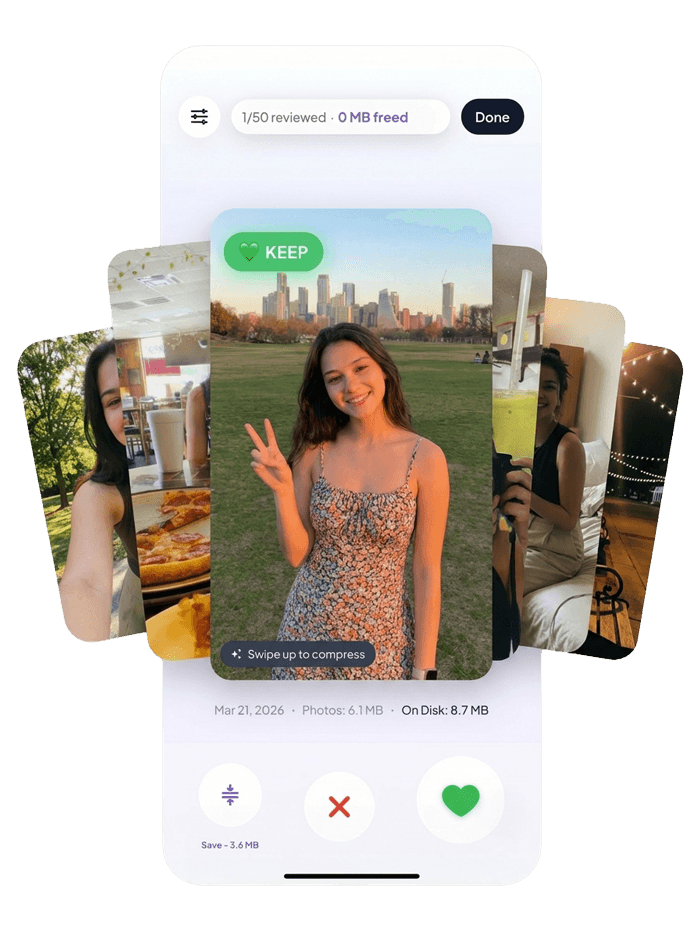
One photo at a time
The whole experience is built around a loop you understand in seconds, with space to change your mind before anything happens.
Swipe right
Leave the photo exactly where it is and move on.
Swipe left
Mark it for deletion, then review everything before it goes.
Swipe up
Keep the memory while giving the file less room on your phone.
A cleanup you can finish
Pruune breaks the work into a short, understandable loop. Start small, make a few decisions, then review everything before it changes.
Start with a small pass instead of facing your entire camera roll at once.
Keep, delete, or compress with one familiar gesture. This is the real app in motion.
Check every pending change before Pruune asks your photo library to apply it.
This photo takes up
8.7MB
The honest number
Pruune shows the real size of a photo while it is in front of you. Keeping, deleting, and compressing stop being abstract choices—you can see exactly what each one gives back.
Your progress stays visible at the top, so even a five-minute pass feels like progress.
The third option
Not every photo belongs in a keep-or-delete argument. Swipe up and Pruune creates a smaller version on your device, then shows you the result before you finish.

Private by default
Review, deletion, and compression happen through your device photo library. Pruune does not need a cloud full of your memories to help you make room.
Your photo and video library is never uploaded to Pruune servers.
Open the app, grant the access you choose, and start reviewing.
Swipes create a review list. Nothing is deleted the moment you swipe.
From the studio
It is a drawer full of things you cared enough to save. Some should go. Some should stay. Some should stay, just smaller.
We made Pruune because every other answer felt like another chore. This one is meant to feel like five quiet minutes you can actually finish.
— Mio Kaza Studio

Pruune is available now. Download it and take back a little room whenever you have five minutes.
For iPhone · No account required